
By 2026, Gen Z (born 1997–2012) will represent a massive share of the global workforce. They are no longer just fresh graduates; they are moving into specialist roles, middle management, and becoming the driving force of corporate innovation.
This generation grew up with smartphones. They are wired to swipe, tap, and consume content in micro-moments. If your training strategy still relies on forcing them to read pages of dense text, you’ve lost before you’ve even started.
For L&D departments, training Gen Z is a unique challenge. Traditional eLearning modules-packed with text-heavy slides or monotonous 30-minute videos are being ruthlessly rejected.
But make no mistake: They aren’t lazy. On the contrary, thanks to the Internet, they are the most potent self-learners in history. The problem isn’t their willingness to learn; it’s the format and the approach.
If you want to design successful eLearning for Gen Z, burn this rule into your mind: Don’t make them read. Let them Show and Touch.
Below, we break down the psychology of Gen Z learners and provide actionable strategies to adapt your training for this digital generation.
1. Decoding the “Gen Z Learning Style”: Why Text is Dead

Before discussing design, we must understand their cognition. Gen Z is the first generation of true “Digital Natives.” They didn’t learn technology; they were born into it.
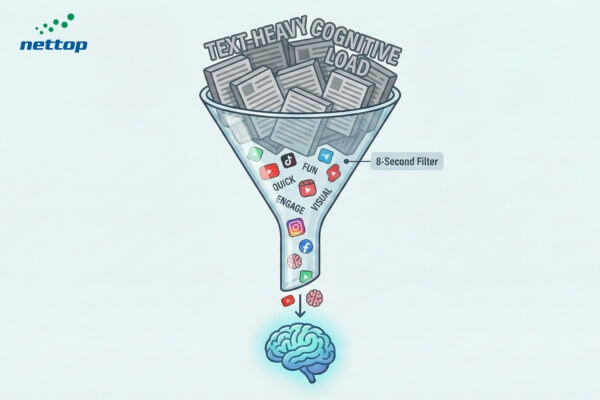
Studies suggest Gen Z has an average attention span of about 8 seconds—shorter than Millennials. But don’t label them “unfocused.” In reality, they possess highly efficient information filters.
In those first 8 seconds, if your content doesn’t answer “How does this help me?” or “Is this interesting?”, they scroll past.
Why does pure text fail?
- Cognitive Overload: Raised on touchscreens and video, their brains process moving images exponentially faster than text. Reading long text on a phone feels like riding a bicycle on a highway.
- Mobile-First Habit: They live on their phones. Long-form text on a 6-inch screen is a UX nightmare.
- Need for Speed: They are used to instant answers from Google or YouTube. They won’t wade through a 10-page manual to find a troubleshooting step.
Gen Z consumes content via short-form video (TikTok, Shorts, Reels), infographics, and interactive formats. They don’t want to be “lectured”; they want to “discover” and “experience.”
2. The “Show” Strategy: Video & Visualization
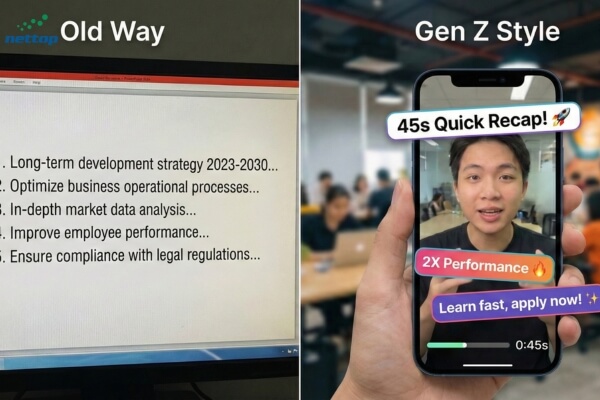
If Gen Z treats YouTube as their university and TikTok as their news feed, your eLearning design must mirror that aesthetic.
2.1. Short, Vertical, and Authentic
Stop wasting budget on 30-minute training videos featuring actors in stiff suits against green screens.
- The Fix: Vertical video, 1–5 minutes max (Microlearning).
- Content: Get straight to the point. Use real employees in real office/factory settings. Authenticity builds trust.
- Tools: Use CapCut, Canva, or AI Video Generators for rapid production.
2.2. Infographics over Bullet Points
Instead of listing 5 bullet points on safety protocols, convert them into a vibrant Infographic or a short Motion Graphic.
- The Rule: 80% Visuals + 20% Text.
- Why: Visuals anchor knowledge in long-term memory far better than text.
3. The “Touch” Strategy: Interaction & Immersion
Gen Z is a generation of gamers. They reject passive consumption; they crave participation, control, and immediate feedback. This is where the “Touch” element becomes critical.
3.1. Interactive Video
Instead of a linear viewing experience, let learners “touch” the video to make decisions.
Example: In a customer service scenario, pause the video and offer choices: A) Apologize immediately or B) Explain the policy. If they choose A, the video branches to show that specific outcome.
Result: This turns a lecture into a “Choose Your Own Adventure” experience, stimulating critical thinking.
3.2. Gamification
Don’t just slap superficial Badges or Leaderboards on a course. Integrate actual game mechanics:
- Challenge: Start with a difficult problem that needs solving.
- Progress Bars: Show them exactly where they stand.
- Instant Gratification: Provide immediate feedback on right or wrong answers. Gen Z thrives on rapid feedback loops.
3.3. Software Simulation
For hard skills, use “Sandboxing.” Don’t teach software via slides; let them click, drag, and operate in a simulated environment.
4. Personalization and Social Connection
Despite their tech-savviness, Gen Z is often reported as the loneliest generation and craves connection.
4.1. Social Learning
Integrate discussion boards, comments, and sharing features directly into your LMS. Encourage User-Generated Content (UGC)—for example, challenge them to record a short video sharing a key takeaway and upload it for reward points.
4.2. AI-Driven Personalization
Use AI to suggest learning paths based on their interests and roles (similar to Netflix recommendations). Gen Z values experiences tailored specifically to them.
5. FAQs: Gen Z eLearning
Focus on the “Why.” Gen Z cares about purpose. Don’t say, “You must do this because it’s the law.” Say, “This course protects you and your team from legal risks and ensures a fair workplace.” And keeps it short and interactive.
There is no absolute number, but the “Goldilocks zone” is 2 to 5 minutes. Attention drops sharply after minute six. If the topic is complex, break it down (Chaptering).
If designed correctly, no. It effectively taps into the psychology of achievement and recognition. Avoid childish graphics; focus on the competitive mechanics and healthy challenges.
6. Conclusion
Designing eLearning for Gen Z requires L&D professionals to shift their mindset from Content Creators to Learning Experience Designers (LXDs).
Don’t fear that short videos or gamification will “dumb down” your content. On the contrary, the ability to distill complex knowledge into simple, engaging experiences is the pinnacle of modern pedagogy.
Gen Z is the future of your business. Speak their language, and they will listen.






 Contact Nettop